


Author Details:
Arjun Chopra
Security Architect
Date Published - 16-07-2026
Xencia Security
On this blog:
Overview
Zero Trust is no longer optional for organizations operating across cloud, remote work, SaaS applications, hybrid infrastructure and distributed data. This blog explains why Zero Trust is important, how Microsoft Security solutions such as Microsoft Entra ID, Microsoft Intune, Microsoft Defender XDR, Microsoft Purview, Microsoft Defender for Cloud, Microsoft Sentinel and Microsoft Global Secure Access work together, and how Xencia helps customers assess, implement, govern and continuously improve their Zero Trust security posture.
Introduction
Why Zero Trust Is Important

Reduce the risk of identity-based attacks and credential misuse.
Ensure only compliant and healthy devices can access business resources.
Limit excessive access through least-privilege and Just-in-Time controls.
Protect sensitive data using classification, DLP, encryption and retention policies.
Reduce dependency on traditional VPN and broad network access.
Improve visibility across users, devices, applications, data and cloud workloads.
Detect suspicious activity faster using integrated security monitoring.
Strengthen regulatory and compliance readiness without disrupting business productivity.
Xencia’s Microsoft Zero Trust Implementation Approach

1. Identity and Access: Establishing the New Security Perimeter
2. Endpoint Trust with Microsoft Intune and Defender for Endpoint
3. Applications and Secure Access
4. Data Protection and Governance with Microsoft Purview
5. Infrastructure and Cloud Workload Protection
6. Visibility, Detection, Response and Automation

Zero Trust Logical Architecture (LLD)
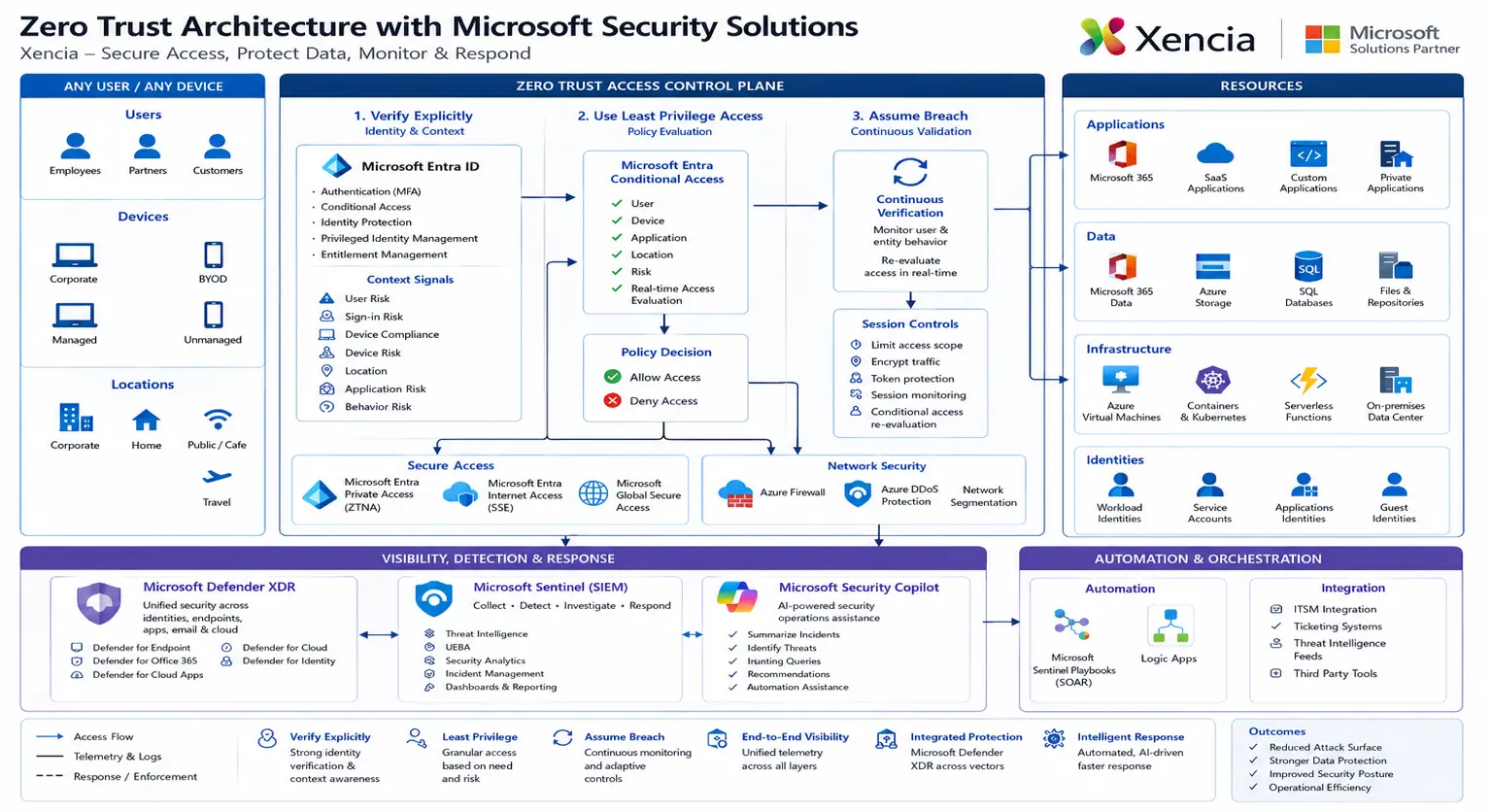
Key Highlights / Use Cases
Secure Microsoft 365 and SaaS access through Microsoft Entra Conditional Access and risk-based policies.
Allow access only from compliant and healthy endpoints managed by Microsoft Intune and monitored by Defender for Endpoint.
Protect sensitive business data using Microsoft Purview sensitivity labels, DLP, Endpoint DLP, audit, retention and eDiscovery.
Reduce broad VPN exposure by moving toward application-specific access using Microsoft Entra Private Access and Global Secure Access.
Detect and respond to incidents using Microsoft Defender XDR and Microsoft Sentinel with integrated analytics and automation.
Improve executive visibility through dashboards, posture reporting, Secure Score tracking and continuous improvement recommendations.
Support compliance and governance initiatives by aligning identity, endpoint, data and monitoring controls to business and regulatory requirements.

Recommended Implementation Roadmap
Assess the current security posture across identity, endpoint, applications, data, cloud, network and SOC operations.
Design the target Zero Trust architecture based on Microsoft Security solutions and customer priorities.
Implement priority controls such as MFA, Conditional Access, Intune compliance, Defender onboarding, Purview DLP and privileged access governance.
Integrate telemetry into Microsoft Defender XDR and Microsoft Sentinel for detection, investigation, hunting and response.
Tune policies, reduce false positives, document operations and provide knowledge transfer to customer teams.
Operate and continuously improve through periodic posture reviews, reporting, compliance alignment and managed security services.
Business Benefits for Customers
Stronger protection against identity compromise and phishing-led attacks.
Better control over unmanaged and non-compliant devices.
Reduced lateral movement through least-privilege access and application-specific access.
Improved data protection through classification, labeling, DLP and lifecycle governance.
Centralized visibility across users, devices, applications, data, cloud workloads and security events.
Improved detection and response through integrated Microsoft Defender XDR and Microsoft Sentinel operations.
Clear roadmap for Zero Trust maturity and security posture improvement.

Conclusion
Zero Trust is not achieved by deploying one tool. It requires a structured security approach across identity, endpoints, applications, data, infrastructure, network and security operations. As a Microsoft Security partner, Xencia helps organizations design, implement and operate a practical Zero Trust model using Microsoft Security solutions.
By combining Microsoft Entra ID, Microsoft Intune, Microsoft Defender XDR, Microsoft Purview, Microsoft Defender for Cloud, Microsoft Sentinel and Microsoft Global Secure Access, customers can move away from implicit trust and build a security model based on continuous verification, least-privilege access, data protection and integrated response.
With Xencia, organizations can build a Zero Trust foundation that is secure, scalable, operationally manageable and aligned to modern business needs.
Looking to modernize your security architecture with Zero Trust? Connect with Xencia to assess your current security posture & build a Microsoft Security-powered Zero Trust roadmap for your organization.